
3 Google Forms Templates for Sports RSVPs with Copy Ready Fields
3 Google Forms Templates for Sports RSVPs with Copy Ready Fields

Yes, Google Forms works well for sports RSVPs and team sign-ups, and it costs nothing to start. The fastest path: copy a sports RSVP template or open a blank form and add three fields, attendance, name, and contact info, then publish the link. Waivers, payments, and real-time roster automation need extra work, either through add-ons or a dedicated app like Roster Sports.
TL;DR:
- Google Forms templates work best for single-game RSVPs, season registrations, or clinic sign-ups, especially with capacity and payment options.
- Essential fields include attendance status, full name, contact information, role, jersey size, and health or waiver disclaimers.
- Sharing should be via short links, QR codes, or email, with responses linked to a Google Sheet for easy filtering and management.
- Add-ons like Form Limiter, Form Ranger, and Payable Forms enhance response control, dynamic options, and payment processing, but recurring events benefit from dedicated apps.
- For ongoing games or league management, switching to a specialized roster app like Roster Sports reduces manual work and automates waitlists and responses.
Table of Contents
- What Templates Work Best for a Sports RSVP in Google Forms?
- How Do You Build a Sports RSVP Form Step by Step?
- What Sports-Specific Fields Do You Need for Waivers and Safety?
- How Do You Share the RSVP Link and Track Who's Coming?
- Which Add-Ons and Integrations Actually Help?
- What Are the Most Common Google Forms RSVP Mistakes?
- What Organizers Learn After Running RSVPs for a Season
- When Should You Switch to a Dedicated Roster App?
- Sources
What Templates Work Best for a Sports RSVP in Google Forms?
Three template types cover almost every recreational or club scenario. Pick based on how often you're running this event and whether money changes hands.
A single-game RSVP is the simplest build: one date, one location, a yes/no/maybe question and a headcount. Use it for pickup games, one-off scrimmages, or a weekend tournament slot. A season or team registration form runs longer and collects more, jersey size, position, emergency contact, and sometimes a waiver acknowledgment. It's the right choice when you're locking in a full roster for a season rather than a single day. A clinic or camp sign-up sits in between: it usually needs age or skill level, a payment or deposit field, and a capacity cap since clinics tend to fill fast.
Whichever template you start from, make these four edits first:
- Update the title, date, time, and location so nothing defaults to placeholder text
- Set a capacity number if the event has a hard cap
- Confirm the contact field actually asks for phone or email, not just name
- Add one short instruction line at the top ("Reply by Thursday so we can lock the roster")
You can pull templates straight from the Google Forms template gallery, from Payable Forms for a payment-ready registration form, or from Doc2Form, which converts an existing PDF registration or waiver into a working Google Form. If a template includes a waiver or payment section you don't need yet, it's usually faster to delete those questions than to rebuild the whole form.
How Do You Build a Sports RSVP Form Step by Step?
Building from scratch takes about ten minutes once you know the sequence. Here's the order that avoids rework later.
- Go to forms.google.com and either start blank or paste a template's copy link into your own Drive.
- Set the title and add a one-line event description (date, location, start time).
- Add an attendance question as multiple choice: "Yes, I'm in," "No, can't make it," "Maybe."
- Add full name as short answer, marked required.
- Add a phone or email field. Google Forms can also collect the respondent's account email automatically if you turn that setting on.
- Add "number attending" if guests or family members are allowed to tag along.
- Add role or position as a dropdown if you're managing a team roster, not just a single event.
- Add jersey size only if you're actually ordering uniforms, this field trips up more forms than it helps when left in by habit.
- Add an open comments field for anything that doesn't fit a dropdown.
If you're short on time, Google Forms' Help Me Create a Form feature accepts a plain-language prompt, something like "RSVP form for a Saturday soccer scrimmage with attendance, name, and phone number", and drafts the fields for you. It won't get everything right, but it saves you from staring at a blank form.
Use Sections (the icon that looks like two horizontal lines) to separate waiver or payment questions from the core RSVP. That way a respondent who's just confirming attendance for a casual game never sees a waiver they don't need, while season registrants get routed to the fuller version. In form settings, turn on "Collect email addresses," write a real confirmation message instead of the default "Your response has been recorded," and decide whether to allow response editing after submission, useful when someone RSVPs "yes" on Monday and needs to flip to "no" by Friday.
Pro Tip: Link responses to a Google Sheet from the very first save, not after 40 people have already responded. Retrofitting the Sheet later means you lose the timestamp history for early replies.
What Sports-Specific Fields Do You Need for Waivers and Safety?
Sports RSVPs carry information a birthday party invite never will: medical details, emergency contacts, and sometimes a legal signature. Get these fields right and you avoid a scramble on game day.
For safety, include:
- Emergency contact name and phone number (required, not optional)
- Any allergies or medical conditions the coach or first-aider should know about
- Parent or guardian name and contact, if any participant is a minor
For waivers, a short in-form acknowledgment checkbox ("I acknowledge the risks of participation and release the organizer from liability") covers casual, low-stakes games. For anything requiring a legally binding signature, link out to a full waiver document or use a file-upload question, and check your state's requirements before treating a checkbox as equivalent to a signed release. Doc2Form exists largely because clubs already have waiver PDFs they don't want to retype from scratch.
For roster management, add availability windows, a primary-versus-alternate designation, and preferred position. Waitlists work fine as a simple label: once attendance hits your cap, change the form description to say "Session full, submissions now join the waitlist" and keep collecting names anyway. Recreational leagues typically build this cap logic manually since Google Forms has no native waitlist feature, one more reason organizers running the same event weekly eventually look for automation instead of rebuilding this logic every time.
How Do You Share the RSVP Link and Track Who's Coming?
Distribution matters as much as the form itself. A well-built form nobody sees fills zero roster spots.
Share it through a shortened link in your group chat, a QR code on a printed flyer for walk-up sign-ups, an embed on your club's website, or a straight email blast. Once responses start landing, connect the form to a Google Sheet and set up columns for confirmed, maybe, and waitlist so you can filter fast.
- Sort the Sheet by attendance status before every game to build a clean printout
- Use Sheet filters, not manual scrolling, once you pass 20 or so responses
- Add a calendar invite link inside your confirmation message so confirmed players get the event on their phone automatically
Event pages that list clear arrival or seating instructions, the way some team community pages structure their RSVP details, tend to get fewer "what time do I actually show up" messages later.
Which Add-Ons and Integrations Actually Help?
Google Forms is free, but a few add-ons solve problems the base tool doesn't touch.
- Form Limiter caps total responses and automatically closes the form once you hit capacity, useful for clinics with a strict headcount.
- Form Ranger pulls dropdown options dynamically from a Google Sheet, so a position list or roster spot count updates without editing the form itself, a fix Google's own community support threads point to often.
- Payable Forms adds Stripe or PayPal checkout for registration fees or uniform orders, though expect a processing fee and a separate provider account.
- Doc2Form turns an existing paper waiver into a digital form instead of rebuilding it field by field.
Pro Tip: If you're rebuilding the same roster from scratch every single week, add-ons are a patch. A dedicated app is the actual fix.
What Are the Most Common Google Forms RSVP Mistakes?
- Missing phone field → add it and mark it required, email alone delays reminders.
- No deadline stated → put a reply-by date in the description, not buried in a follow-up message.
- Confirmation message left as default → rewrite it with next steps and a cancellation contact.
- No plan for last-minute drop-outs → keep the edit-after-submit setting on so "yes" can become "no."
Send one reminder 48 hours out using each respondent's edit link, and store any Sheet with medical or emergency data with restricted sharing, not "anyone with the link."
What Organizers Learn After Running RSVPs for a Season
Every organizer who's run a season of games on Google Forms eventually builds the same three habits: a pre-event checklist, a printed day-of roster, and a follow-up reminder sent the morning of the game, not the night before. Those habits fix the recurring headaches, but they don't fix the recurring work.
That's the gap Roster Sports was built around: one invite link, real-time fills, and an automatic waitlist instead of a spreadsheet you refresh by hand every week.
— Daniel
When Should You Switch to a Dedicated Roster App?
Google Forms is genuinely a good tool for a one-off tournament sign-up or a season registration you set up once. Where it runs out of road is recurring games, weekly pickup runs, drop-in leagues, anything where the roster needs to fill itself and refill itself when someone bails Thursday night.
Roster Sports was built for exactly that gap. Share one link, and open spots fill in real time while dropouts automatically pull the next person off a waitlist, no manual Sheet-sorting required.
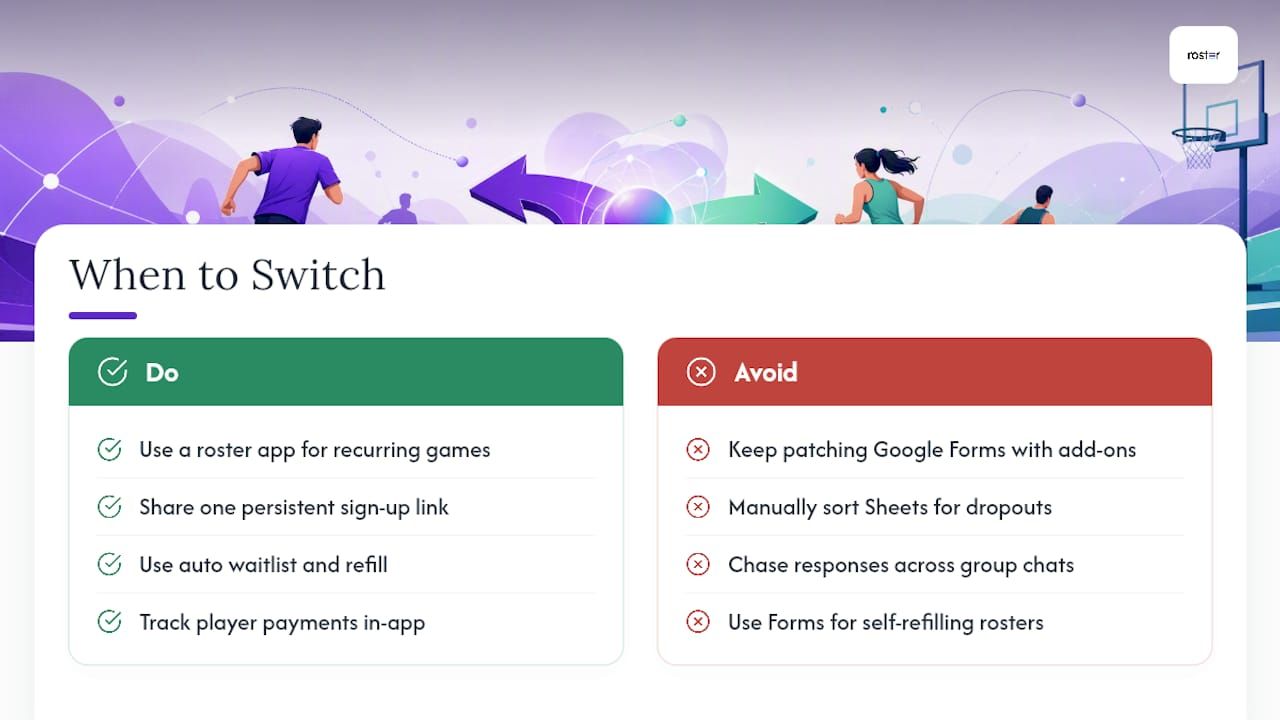
If you're managing a recurring pickup game, a season-long roster, or anything where you're tired of chasing responses across three group chats, that's the signal to stop patching Google Forms with add-ons and start with a tool built for the job. The app also provides features that help managers track payments among players. Check out the Roster Sports app and set up your first game link in a few minutes.
Sources
Recommended