September 16, 2026
One Signup Link That Ends Chasing Money for Cashless Pickup Games


Yes, cashless pickup games work, but only when payment is tied directly to signup and roster automation handles the rest. Require a deposit or full payment before a player claims a spot, run your roster through a tool with auto-promote waitlist features, and post a short policy like "no pay, no play." Roster's whole model is built around that exact sequence.
TL;DR:
- Requiring full or deposit payment before signup significantly reduces no-shows and simplifies roster management through automation.
- An automated system with capacity limits, waitlist promotion, and payment flags ensures a full, paid roster without manual texting or tracking.
- Integrated payment methods tied directly to registration eliminate reconciliation chaos and prevent policy violations associated with personal apps like Venmo.
- Clear policies on deposits, refunds, and deadlines, combined with automated reminders, minimize disputes and ensure smoother cancellations.
- Automation shifts focus from logistical chores to building group loyalty, especially when paired with a stable schedule, explicit rules, and shared responsibilities.
Table of Contents
- What Tools Do You Need to Run Cashless Pickup Games?
- Cash, Venmo, or Card: Which Payment Method Actually Works?
- How Do You Stop Chasing Players for Money?
- Why Automation Frees You to Manage the Group, Not the Spreadsheet
- Why Roster Matches This Whole Checklist
- Sources
- FAQ
What Tools Do You Need to Run Cashless Pickup Games?
The right setup replaces four separate headaches, group texts, spreadsheet tracking, cash envelopes, and manual waitlist juggling, with one linked system. A modern signup tool should give you a real-time roster view, a capacity cap you set once, and a payment-status flag next to every name so you know at a glance who's actually paid and who's just claimed a spot.
The core feature set worth demanding from any platform:
- Capacity limits that lock a game at your chosen headcount instead of relying on someone to count heads in a group chat.
- Auto-promote waitlist that bumps the next person in line the moment a spot opens, without you sending a single text.
- Payment-status flags visible next to each player's name, so unpaid spots are obvious before game day.
- Guest onboarding links that let a friend-of-a-regular join without you manually adding them to a roster.
- Reminder automation that pings players about payment and game details on a schedule you set once.
Before you publish a game, run through a short checklist: date and time, hard capacity number, skill-level splits if you run mixed levels, whether payment is required at signup or by a cutoff, your cancellation deadline, and your reminder schedule. Nail those six items and most disputes never happen.
The payoff shows up fastest in substitutions. When a regular cancels Tuesday night, a dedicated signup and waitlist tool automatically notifies the next alternate, moves them into the paid roster slot, and updates the group without you touching your phone. That single feature is often the difference between a full field Saturday morning and three people standing around wondering who's actually playing.
Pro Tip: Keep your alternate pool larger than you think you need. A roster that's only exactly full has zero cushion the first time two regulars cancel on the same day.
Cash, Venmo, or Card: Which Payment Method Actually Works?
Peer-to-peer apps like Venmo and Zelle feel effortless because everyone already has them installed. That familiarity is also the problem. These apps were built for splitting dinner bills, not running a recurring business relationship with 18 players a week, and the risks show up fast:
- Policy violations. Personal Venmo and PayPal accounts can get flagged or frozen when they're used for what looks like recurring business activity, and you find out at the worst possible time.
- No link to your roster. A payment lands in your account with a name that may not match your signup sheet, so you're manually cross-referencing who paid against who's on the list.
- Reconciliation chaos. Collecting through cash, Zelle, Venmo, and cards all at once creates a real administrative burden, since every channel needs to be checked separately against the roster.
Integrated payment at signup solves the core issue by tying the transaction directly to the roster entry. When someone signs up and pays through the same flow, reconciliation stops being manual work entirely, and refunds route back through the same system that took the payment.
A hybrid model works for a lot of pickup groups: collect a deposit through an integrated card flow at signup, then let players settle small incidentals, an extra guest fee, a court-rental split, through peer-to-peer apps since those amounts are low-stakes. Whatever you choose, never route club money through a personal account you also use for rent and groceries. A dedicated account, even a simple one, keeps your recordkeeping clean if a dispute or a tax question ever comes up.
How Do You Stop Chasing Players for Money?
A written policy handles ninety percent of the disputes before they start, because most payment friction comes from ambiguity, not bad faith. Post something short and specific, not a wall of legal language:
That single paragraph, pinned to your signup page, eliminates the "can I pay you Saturday" conversation entirely.
A few operational rules make the policy stick:
- Collect deposits at season start for recurring games; charge full payment at signup for one-off pickup games, since there's no ongoing relationship to protect a late payer's spot.
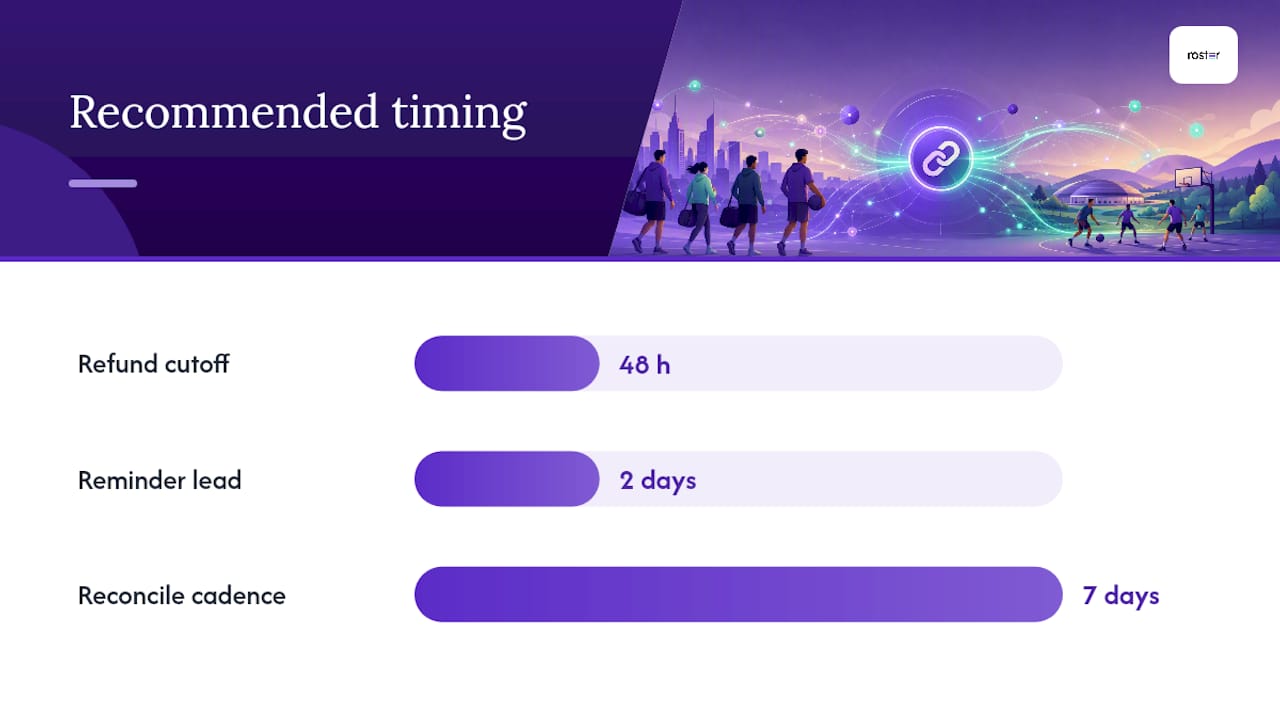
- Set a refund window, 48 hours before game time is common, and state it in the same policy text so cancellations don't turn into arguments.
- Reconcile weekly, not monthly. Check payment status against your roster every week so a missed payment gets caught while it's still fixable, not three games later.
- Automate your reminders so players get a nudge two days before the cutoff, not a scramble text from you the morning of.
Pro Tip: Put your cancellation cutoff earlier than feels comfortable. A 48-hour window gives you actual time to fill a spot from the waitlist instead of eating an empty slot.
Why Automation Frees You to Manage the Group, Not the Spreadsheet
The best pickup organizers I've watched succeed didn't get there by working harder on logistics. They got there by handing logistics to a system and spending their saved time on the thing that actually keeps a group alive: the social contract that makes people show up week after week.
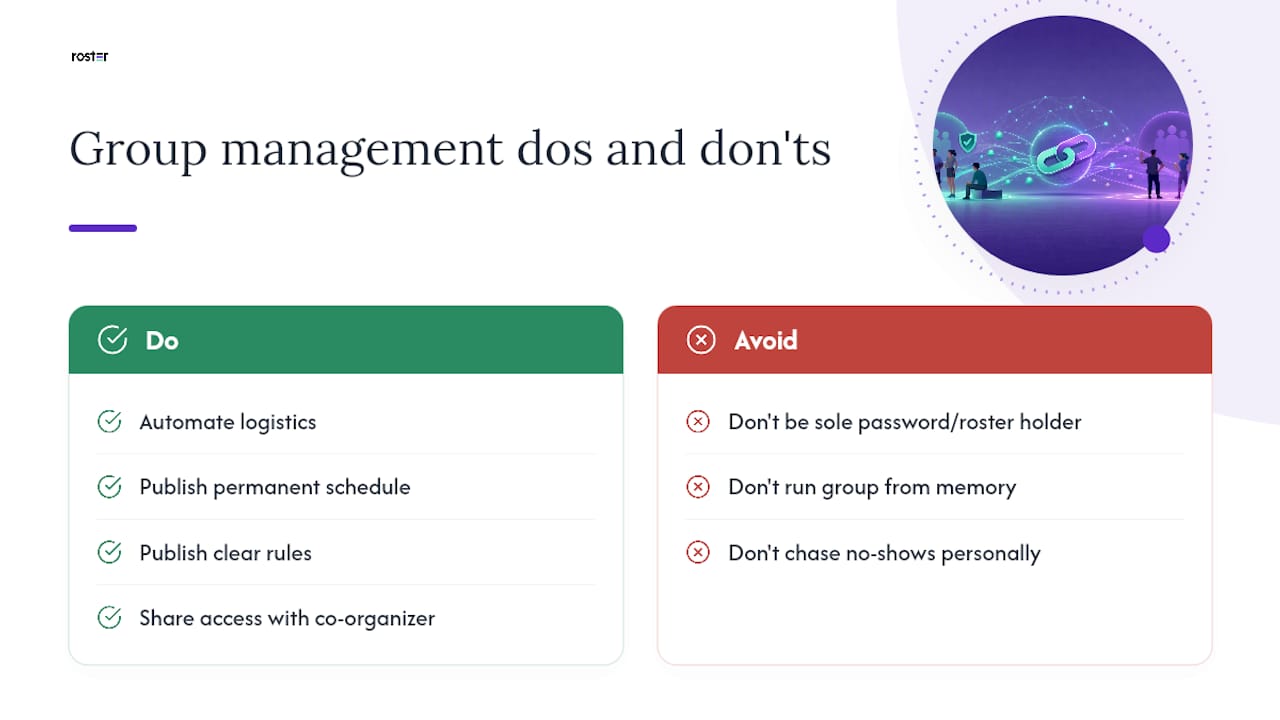
Groups that publish a permanent schedule, clear rules, and a guest policy survive turnover far better than groups run entirely from one person's memory. Automation only works when there's something stable underneath it to automate.
That's also why splitting duties matters. If you're the only person who knows the Venmo password and the roster logic, your group has a single point of failure. Bring in a co-organizer early, even for something as small as sending reminders, and keep your alternate pool bigger than your minimum. A clear no-show policy does more for retention than any amount of personal chasing ever will.
— Daniel
Why Roster Matches This Whole Checklist
Roster is built around the exact workflow this article just laid out: one signup link, automated roster and waitlist management, and payment tracking tied directly to who actually shows up. When a regular drops, Roster promotes the next alternate automatically and keeps your payment status visible without a single group chat message.

Managers pay fees based on player participation, with billing handled automatically after the game through Fitness Flow's operating system for modern gyms to reduce administrative overhead. If you want to see the feature set in action, check the app links page or browse the full product overview to see how the billing model and roster tools fit together. Set up your next game, share one link, and let the roster fill itself.
Sources
For message templates that improve response rates, see 6 game invite message elements that fill rosters. For onboarding strategies that keep new players coming back, read how adults find and run inclusive pickup games. And for a copy-paste enforcement template, check a no-show fee policy that keeps pickup games full.
- How to build a pickleball group that lasts
- Sports Club Membership Fee Collection: The Complete Guide for Club Owners and Coaches - UpCoachy
- How to Collect Youth Sports Payments | Centro
FAQ
Is It Normal to Require Payment Before a Pickup Game?
Yes. Requiring payment or a deposit at signup is standard practice for recurring pickup games and is the single biggest factor in eliminating chasing money after the fact.
Should I Use Venmo or an Integrated Payment System?
Venmo works fine for small, casual splits, but integrated payment at signup ties money directly to your roster and removes manual reconciliation, which matters once your group grows past a handful of regulars.
How Far Ahead Should My Refund Cutoff Be?
A 48-hour cancellation window before game time is common and gives you enough runway to fill the spot from your waitlist instead of losing the payment entirely.
Can Roster Handle Peer-to-Peer Payment Tracking?
Yes, Roster integrates peer-to-peer Venmo payment tracking between players and managers, so payment status stays visible right alongside the roster and waitlist.
What Should a Basic Cashless Payment Policy Include?
Cover the deposit amount, the due date, accepted payment methods, and a clear "no pay, no play" enforcement line so your spot release rules are unambiguous.