September 15, 2026
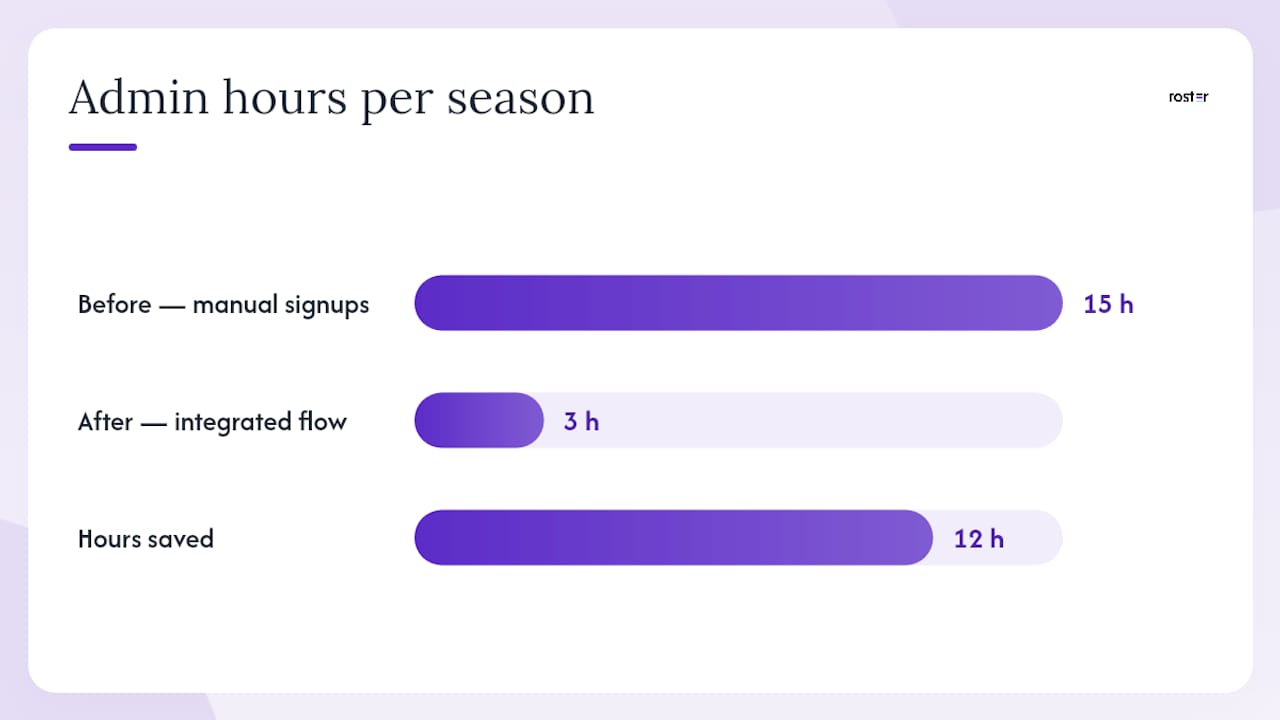
Organizers: Save 12 Admin Hours a Season with One Shareable Game Link


A shareable game link is a single URL that lets an organizer post one game (sport, time, location, capacity, price) and let players RSVP, land on the roster or waitlist, and settle up, all without a single group chat. It replaces the "who's in?" text thread with one page that enforces headcount automatically. Roster Sports and similar tools build entire apps around this workflow, and once you've run a season on one, going back to manual headcounts feels like using a fax machine.
TL;DR:
- Shareable game links automatically enforce capacity limits and promote waitlist players, reducing manual headcounts and last-minute notifications.
- Setting the RSVP deadline at least 24 hours before the game allows timely waitlist promotions and minimizes last-minute cancellations.
- Organizers should post the game link about a week in advance, with reminders at 48 hours and on the same day, emphasizing urgency with remaining spot counts.
- Requiring payment at signup for games over $10 improves registration completion rates by reducing post-game reconciliation work.
- Using platforms like Roster Sports centralizes RSVPs and payment tracking, saving organizers hours of administrative effort each season.
Table of Contents
- How Does a Shareable Game Link Actually Work?
- How Do You Set Up a Shareable Game Link Step by Step?
- Where Should You Share Your Game Link?
- How Do You Manage Alternates and No-Shows on Game Day?
- What's the Simplest Way to Handle Payments?
- What One Link Actually Changed for My Weekly Game
- Try Roster Sports for Your Next Pickup Game
- Sources
- FAQ
How Does a Shareable Game Link Actually Work?
The link points to a signup page, and that page does the job three or four group chat admins used to split between them. A player taps it, fills in their name and phone number, checks a waiver box if you require one, and picks a payment method if you're collecting money up front. That's the entire signup experience for them.
Behind the scenes, the link enforces the rules you set. Once your roster hits capacity, new sign-ups automatically drop into an alternate slot or a waitlist instead of overfilling the game. When a regular cancels, the next person in line gets promoted, usually with a notification, so you're not manually texting the fourth-string goalie at 9 p.m. the night before.
What the link handles automatically:
- Capacity tracking against your set roster size
- Waitlist ordering and promotion when a spot opens
- Basic reminder notifications ahead of game time
- A running record of who's confirmed, who's an alternate, and who paid
What still needs a human: assigning team captains, resolving disputes over who "actually" called a spot first, and deciding whether a chronic late-canceler gets bumped down the priority list. No link does that judgment call for you.
Pro Tip: Set your cancellation cutoff at 24 hours instead of same-day. It gives the waitlist promotion time to work before the alternate has already made other plans.
How Do You Set Up a Shareable Game Link Step by Step?
Building the page takes less time than typing out a group text explaining the rules for the fifth week in a row. Here's the order that avoids backtracking:
- Name the sport and format clearly (5v5 soccer, coed volleyball, drop-in basketball) so there's no ambiguity in a shared inbox of games.
- Set date, time, and precise location, down to the specific field or court number, not just the park name.
- Lock in capacity, then decide your alternate count separately, most organizers run 2 to 4 alternates depending on how flaky the group historically is.
- Choose your payment mode, either collect payment at signup or track peer-to-peer Venmo payments against each roster spot afterward.
- Add a waiver checkbox and require a phone number, so you have a way to reach anyone who no-shows or gets hurt.
- Set an RSVP deadline a day or two before the game, giving the waitlist room to fill any late cancellations.
- Write a short "what to bring" note (cleats, colored jersey, cash for parking) so the day-of questions stop hitting your phone.
List the game itself as its own entry rather than folding it into a general field-booking post. Separating the game from the venue helps people who are searching to join a game rather than book a court, and it keeps your signup link from getting buried under facility information nobody needs twice.
Pro Tip: Put the price and the capacity number in the very first line of the description. Players decide whether to click through in about three seconds, and vague listings lose them.
Where Should You Share Your Game Link?
The link itself does the collecting, but it only works if it lands where your players actually look. A few channels consistently outperform the rest for adult pickup sports:
- Existing group chat threads (text or WhatsApp), pasted as the single source of truth instead of a debate thread
- Instagram Story or link-in-bio for recurring weekly games with a rotating crowd
- Local community boards or sport-specific Facebook groups for open games needing new faces
- A QR code taped to the equipment bag or posted field-side for walk-up signups
Post the link about a week out, send a reminder 48 hours before, and fire off a same-day nudge to anyone still unconfirmed. That cadence catches procrastinators without becoming spam. Every message should hit sport, date, time, location, and price in the first two lines, plus a live count of remaining spots, since urgency ("3 spots left") converts better than a flat invite. Roster Sports's own invite message templates break down which specific elements move a scroller into a signup, worth stealing wholesale if you're writing your own posts. Organizers running inclusive pickup games often find posting the link in multiple neighborhood-specific groups fills spots faster than relying on one main channel. Promoting the game with those specifics across social platforms and local boards consistently pulls in players who wouldn't have found a plain text invite.
How Do You Manage Alternates and No-Shows on Game Day?
Your roster rules only work if you apply them the same way every week. Adult pickup games see far more week-to-week attendance swings than youth leagues, which is exactly why a standing sub or free-agent pool matters more than most organizers assume going in.
A few rules keep this from turning into a mess:
- Cap subs per team (2 is common) so one side doesn't stack the roster with ringers
- Promote alternates in the order they joined the waitlist, not by who texts you first
- Confirm attendance at check-in and mark payment status on the spot, not after
- Log who actually played versus who paid, since those two lists rarely match perfectly
Waitlist promotion works best when it's automatic and visible. Players trust a system that fills spots in order far more than one where the organizer plays favorites by text. Tracking no-show patterns over a season also tells you who to quietly move down your alternate priority, which saves you from the same person burning a spot four weeks running.
What's the Simplest Way to Handle Payments?
Requiring payment at signup guarantees you're not chasing money after the whistle blows, but it can slow down sign-ups for casual, low-stakes games where people expect to pay in person. Peer-to-peer collection (mostly Venmo) keeps the signup frictionless but pushes the reconciliation work onto you after the fact.
A workable middle ground:
- Use integrated payment at signup for anything over $10 per player, where chasing cash isn't worth your time
- Track peer-to-peer Venmo payments against each name on the roster as they come in, not in a separate spreadsheet
- State your no-show and refund policy in plain language on the signup page itself, not buried in a group chat
- Keep the payment instructions to one line: sport, price, Venmo handle or link, due date
Switching from a manual sign-up sheet to an integrated registration flow with payment and waivers built in showed a documented 45% jump in completed registrations in one case study, along with a cut from 15 admin hours down to 3 per season. That gap is the real cost of chasing Venmo requests one by one.
Pro Tip: Set your refund policy to "credit toward next game" instead of cash back for late cancellations. It cuts disputes without punishing players who genuinely can't make it.
What One Link Actually Changed for My Weekly Game
Before I moved to a single signup link, Sunday mornings meant scrolling three separate group chats to figure out if we had enough players. Now the roster fills itself, alternates get promoted the second someone drops, and the group chat is back to being a place for trash talk instead of headcounts. Grab the invite message templates if you're writing your first one this week.
— Daniel
Try Roster Sports for Your Next Pickup Game
There are apps built specifically for the workflow described above: one link that automates roster management, promotes alternates off the waitlist in real time, and tracks Venmo payments against each player instead of leaving you to reconcile a spreadsheet after the fact. The platform centralizes RSVPs and payment tracking so a coordinator spends less time chasing texts and more time actually playing.

For organizers still running games through a group chat and a mental tally, switching to modern tools makes the shift surprisingly simple. You set the sport, date, capacity, and price once, share the link, and the app handles who's in, who's waiting, and who owes what. Check out the game management app and set up your next game in the time it would take to write out the same invite by hand.
Sources
- How to Start an Adult Recreational Sports League: Complete Guide (2026) | leaguearc
- How to start a pickup soccer game that survives past week three · SoccerMapd
- How to Organize a Local Pickup Sports Game - The Fitness Arsenal
FAQ
Do Players Need an Account to Use a Game Link?
No. Most shareable game links let players RSVP with just a name and phone number, no app download or account creation required to join a single game.
What Happens if the Game Fills Up?
Additional sign-ups land on a waitlist and get promoted automatically, in order, whenever a confirmed player cancels their spot.
Can I Require Payment Before Someone Joins the Roster?
Yes, most platforms let you require payment at signup, though many organizers of casual games still prefer tracking peer-to-peer Venmo payments after the roster fills.
How Far in Advance Should I Post the Link?
Post about a week before the game, send a reminder 48 hours out, and follow with a same-day nudge for anyone still unconfirmed.
Does Roster Sports Handle Waivers and Contact Info?
Some platforms collect waiver acknowledgment and contact details at signup, so organizers have that information on hand without a separate form.